8bitDo Controller Ultimate 2
Your Playnix console comes bundled with the 8bitDo Controller Ultimate 2, a premium wireless gaming controller designed for comfort and precision.

Controller Overview
The 8bitDo Controller Ultimate 2 features:
- Hall Effect Sticks - Drift-free precision joysticks
- Hall Effect Triggers - Responsive analog triggers
- Wireless Connection - 2.4GHz and Bluetooth support
- Rechargeable Battery - Up to 30 hours of playtime
- Customizable - Programmable buttons and profiles
- Multi-Platform - Compatible with PC, Switch, and mobile devices
Controller Layout
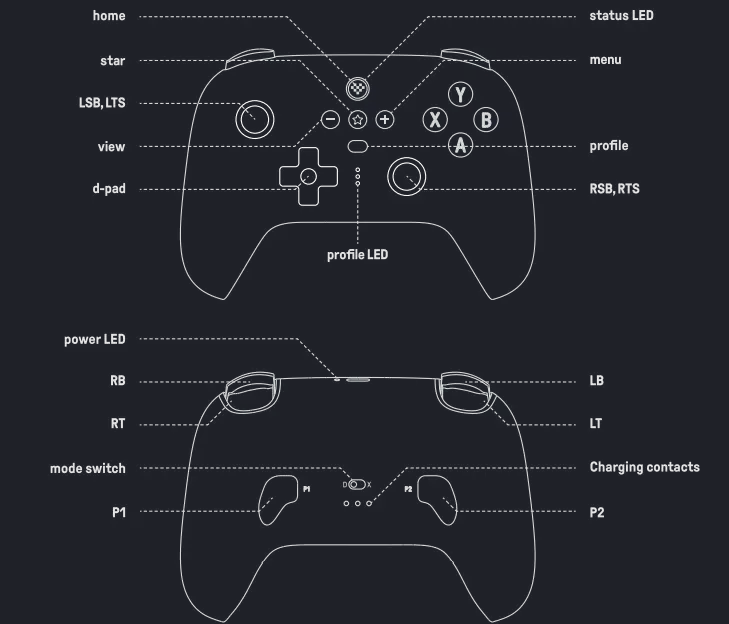
Front Face Controls
| Control | Function |
|---|---|
| Left Stick | Character movement, menu navigation |
| Right Stick | Camera control, aiming |
| D-Pad | Directional input, menu navigation |
| A Button | Confirm, primary action (right side) |
| B Button | Cancel, secondary action (bottom) |
| X Button | Context action (top) |
| Y Button | Context action (left side) |
| L1 / LB | Left bumper button |
| R1 / RB | Right bumper button |
| L2 / LT | Left trigger (analog) |
| R2 / RT | Right trigger (analog) |
Top Edge Controls
| Button | Function |
|---|---|
| Home Button | Opens Steam overlay/menu (center, with logo) |
| Screenshot | Capture screenshot (left of Home) |
| L3 | Left stick click |
| R3 | Right stick click |
Back Controls
| Control | Function |
|---|---|
| P1/P2 Switch | Select controller profile |
| Charging Port | USB-C charging port |
| Power Button | Press and hold to power on/off |
Powering On/Off
Turning On
To power on your controller:
- Press and hold the Home button (center button with logo) for 2 seconds
- The controller LED will illuminate
- It will automatically pair with your Playnix console
- When connected, the LED will remain solid
Turning Off
To power off your controller:
- Press and hold the Home button for 5 seconds
- The LED will blink and then turn off
- The controller will disconnect
Auto-Sleep
The controller automatically enters sleep mode after 10 minutes of inactivity to conserve battery. Press any button to wake it.
Charging Your Controller
Battery Information
- Battery Type: Built-in rechargeable lithium-ion
- Playtime: Up to 30 hours per charge
- Charging Time: Approximately 3-4 hours (full charge)
- Battery Life: 500+ charge cycles
How to Charge
- Connect a USB-C cable to the charging port on the controller's dock or plug a USB-C cable directly into your controller
- Connect the other end to a USB power source:
- Your Playnix console's USB port
- A USB wall charger (5V/1A minimum)
- A computer USB port
- The LED will pulse while charging
- The LED will become solid when fully charged
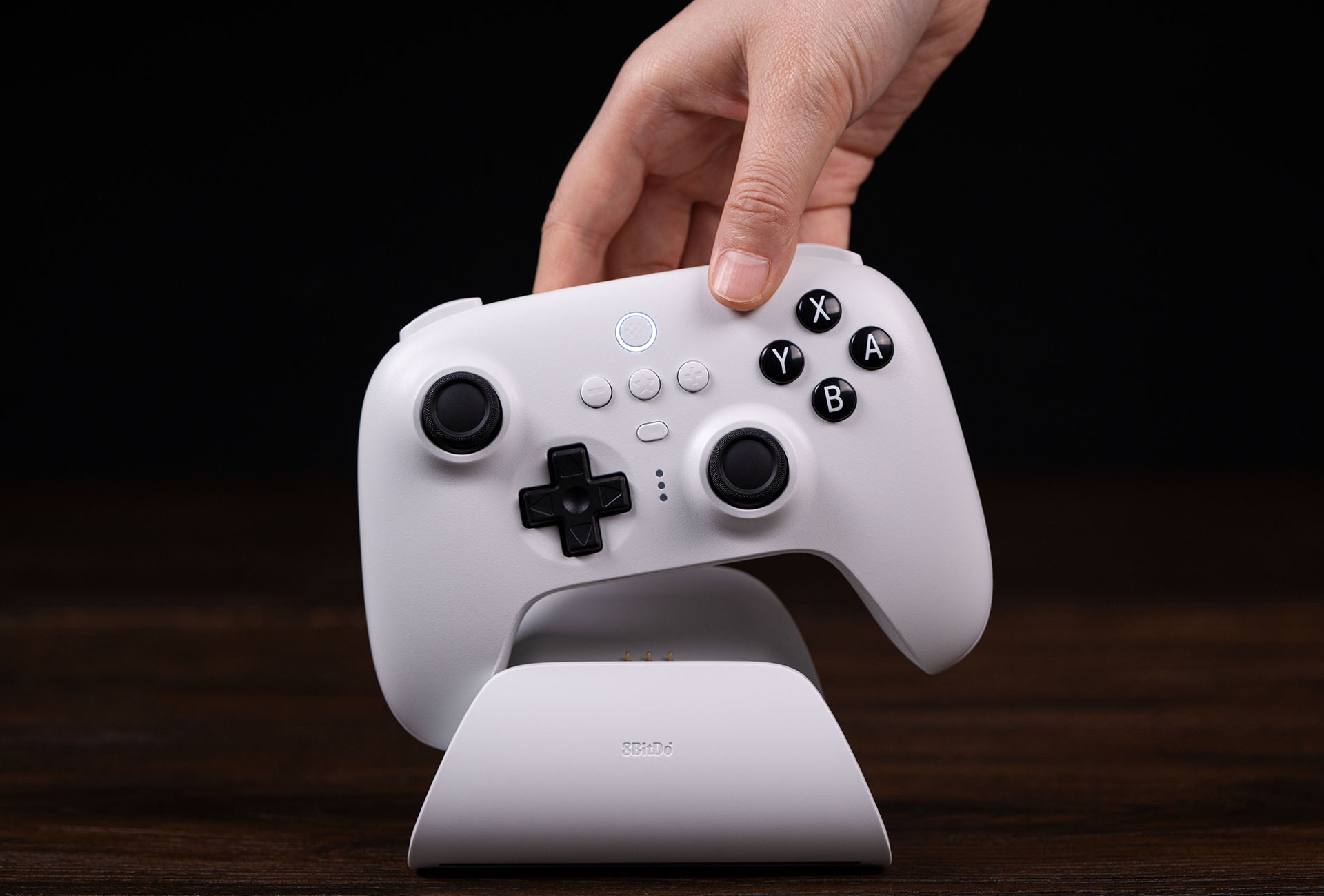
Play While Charging
You can continue using the controller while it charges, though it will operate in wired mode during charging.
Battery Status
To check battery level:
- Press the Home button to open the Steam overlay
- Navigate to System → Controller Settings
- Battery percentage is displayed next to your controller
Low battery indicators:
- LED blinks slowly when battery is below 20%
- LED blinks rapidly when battery is below 5%
- On-screen notification when battery is critically low
Button Functions in Steam
Essential Controls
Home Home Button (Center)
- Single press: Opens Steam overlay
- Long press (2s): Opens quick access menu
- Very long press (5s): Power off controller
++view++ View/Back Button (Left of Home)
- Opens game-specific menus
- Functions as "Select" in many games
- Takes screenshots when configured
Menu Menu Button (Right of Home)
- Opens in-game menus
- Functions as "Start" in many games
- Accesses game options
Advanced Features
Haptic Feedback
The controller features advanced haptic feedback:
- Adjustable vibration intensity
- Compatible with games supporting HD rumble
- Can be configured in Steam settings
To adjust haptic settings:
- Open Steam overlay with Home
- Navigate to Settings → Controller
- Adjust Haptic Feedback Intensity
Dead Zone Calibration
For optimal precision:
- Open Steam overlay
- Go to Settings → Controller → Calibration
- Follow on-screen instructions to calibrate sticks
- Save your profile
Troubleshooting
Controller Won't Turn On
- Check battery: Charge for at least 30 minutes
- Try hard reset: Hold Home button for 10 seconds
Controller Not Connecting
- Ensure controller is powered on
- Move closer to console (within 10 feet)
- Remove interference sources (other wireless devices)
- Try restarting both controller and console
Input Lag or Delay
- Move closer to the console
- Check for wireless interference
- Ensure controller firmware is up to date
- Try using wired mode (USB-C cable) temporarily
Stick Drift Issues
The Hall Effect sticks are designed to be drift-free, but if you experience issues:
- Recalibrate the sticks in Steam settings
- Clean around the stick base with compressed air
- Update controller firmware
- Contact support if issues persist
Buttons Not Responding
- Clean button surfaces gently with isopropyl alcohol
- Check button mapping in Steam controller settings
- Restore default button configuration
- Update controller firmware
Maintenance & Care
Cleaning
- Use a soft, slightly damp cloth for exterior
- Use compressed air for crevices and button gaps
- Never use solvents, alcohol-based cleaners, or abrasives
- Keep away from liquids
Storage
- Store in a cool, dry place
- Avoid extreme temperatures (below 0°C or above 40°C)
- Keep away from direct sunlight
- Charge every 3 months if not in use
Battery Care
- Avoid completely draining battery frequently
- Charge before long storage periods
- Don't leave charging for more than 24 hours continuously
- Normal battery degradation occurs after 500+ cycles
Specifications
| Specification | Details |
|---|---|
| Connectivity | 2.4GHz wireless, Bluetooth 5.0, USB-C wired |
| Battery | 1000mAh rechargeable Li-ion |
| Playtime | Up to 30 hours |
| Charging | USB-C, 5V/1A minimum |
| Weight | Approximately 240g |
| Dimensions | 153mm x 106mm x 61mm |
| Warranty | 1 year (covered by Playnix) |
Remember: Your 8bitDo Controller Ultimate 2 is a premium gaming controller designed for thousands of hours of gameplay. Treat it well and it will serve you for years!
For more technical support, visit our Troubleshooting Guide.